
Software News
New simulation models for function deployment of mechatronic systems on the way from dSPACE
dSPACE will introduce a new category of simulation models as a major extension to its Automotive Simulation Models (ASM) product line this summer.

The new models, referred to as ASM Operator Versions, are designed for function engineers and users who require particularly easy-to-use simulation tools to design mechatronic systems. For use in the early development phases, the models have been optimized for PC-based simulation with Simulink.
The functionality, simulation quality, and parameterization options of the ASM Operator Versions are equivalent to dSPACE’s original ASM products, whose range of applications run from function design to hardware-in-the-loop testing. The component-based structure consisting of Simulink libraries is also identical to that of the earlier ASMs. The components are accessible in the model so that their input/output behavior can be studied.
The fundamental difference of these lower-cost models lies in the implementation of the library components. All components are freely accessible in the original ASMs, even at the lowest implementation level. The Operator Versions, however, encapsule a separate system, which ensures good performance during Simulink simulation.
The first ASM Operator Versions to become available will be for vehicle dynamics and chassis applications. Typical possible applications are closed-loop tests of controller functions with model-in-the-loop (MIL) and/or software-in-the-loop (SIL), and also vehicle dynamics tests and parameter studies.
This new model category is compatible with the ASMs and can be parameterized in ModelDesk, dSPACE parameterization software. Exchanging data sets (model parameters, road descriptions, maneuver descriptions) between the model categories and reusing them is easy, which supports a seamless development process.
Want more information? Click below.
dSPACE
Software Products
Pro/ENGINEER Model Clean-up Utilities for Windchill Migration released
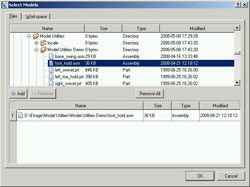
When migrating to Windchill PDMLink or Windchill INTRALINK from Pro/INTRALINK 3.X there may be issues that need to be resolved. Etrage has provided a solution with the release of Pro/ENGINEER Model Clean-up Utilities (MCU) for Windchill Migration.
The MCU is used to clean up, consolidate, and standardize Pro/ENGINEER parameters, layers, and family tables. Standardized Pro/ENGINEER parts, assemblies, and drawings help to ensure order and consistency with the model configuration and metadata as well as remove erroneous or unnecessary data prior to migrating to Windchill.
Want more information? Click below.
Etrage
Part photos increase order-picking accuracy
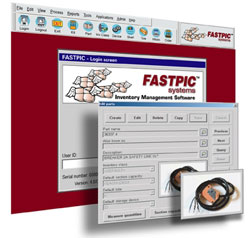
FastPic4 inventory management software automatically displays a photo of the item the operator is required to pick, increasing accuracy rates to 99.9%. In operations where accuracy levels are critical, the FastPic photo database feature helps reduce operator error.
Once an image of the part is uploaded to the software, every time that part is required for picking the software displays a thumbnail photo of the item automatically. When needed, the operator can enlarge the photo with a simple click. For replenishing inventory, this feature can be used to visually verify SKUs, increasing operator productivity by eliminating the need to verify part numbers.
Want more information? Click below.
FastPic Systems
Innovative planning software for assembly and packaging apps

New software from Rexroth’s Linear Motion and Assembly Technologies group simplifies conveyor system planning and application by using 3D solid model and electronic catalog technology to put all required product information within easy reach.
The new software, called MTpro, saves OEMs, integrators, and end users time and money in the planning, layout, and procurement of components and complete modules for assembly and packaging applications. Coupled with Rexroth’s existing planning tools, including FMSsoft, online 2D CAD, 3D models, and chain calculation tools, MTpro provides the most extensive array of tools available.
Want more information? Click below.
Bosch Rexroth
EnSuite delivers support for point cloud files

CCE has announced that EnSuite Version 2, its multi-CAD viewing, translation, and productivity software, has been upgraded to support point cloud files. EnSuite Version 2 can be used to import point cloud files in .xyz and .csv files that are typically produced on a coordinate measuring machine (CMM), laser scanner, or other inspection equipment.
Point clouds imported into EnSuite can be graphically compared against a CAD model. EnSuite produces a color error map of the point cloud vs. the CAD model by displaying the differences between the two in a range of colors. Color-coding greatly reduces the time required to identify and understand differences and evaluate their seriousness. For example, if a boss is too long or too short, the top of the boss will be highlighted in red. Color error maps make it possible to analyze problems in seconds that might take hours to understand when looking at point cloud coordinates in a spreadsheet.
Want more information? Click below.
CCE
New toolbox gives engineers access to 1,300+ computational routines

Engineers and others needing powerful tools for optimization, modeling, and simulation can now use the NAG Toolbox for MATLAB released by the Numerical Algorithms Group. The Toolbox gives users access to more than 1,300 additional math and statistical algorithms within the MATLAB environment. This additional mathematical and statistical functionality was previously unavailable or accessible to MATLAB users only by purchasing multiple toolboxes.
NAG Toolbox for MATLAB provides access to the NAG Library, the largest and most comprehensive collection of mathematical and statistical algorithms available today. The NAG Library is used by many of the world’s most prominent manufacturers, scientists, and academies, among others, because of its reputation for quality, flexibility, and robustness.
Want more information? Click below.
NAG
New release extends realistic simulation capabilities
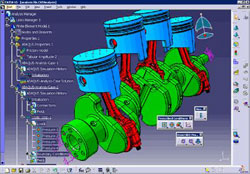
Dassault Systèmes announces the availability of Abaqus for CATIA V5 R18 SP4 from its SIMULIA brand for realistic simulation. New and enhanced capabilities:
- Natural frequency analysis on the unloaded structure, or after any level of loading
- Enhanced precision in setting up models involving contact — nodal adjustments made by the Abaqus solver can be previewed in the user interface
- Improved CATIA Octree meshing to provide a higher level of element quality when working with Abaqus models
- Element quality checks implemented in CATIA specifically for Abaqus users
Want more information? Click below.
Dassault Systèmes
Inspection software for users of multi-sensor metrology systems
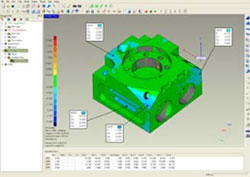
Geomagic has released Geomagic Qualify 10, the new computer-aided inspection software for users of multi-sensor metrology systems. Geomagic Qualify 10 streamlines workflow, improves alignment accuracy, and provides comprehensive inspection coverage for users who want to take advantage of the combined strengths of 3D scanners and hard probes. A single interface enables users to perform a complete inspection of every type of shape and feature that characterizes an object, saving time and increasing inspection accuracy.
New capabilities in Geomagic Qualify 10 enable users to quickly detect and inspect geometrical features such as points, holes, slots, cones, cylinders, planes, and spheres. The software automates feature creation and tasks such as calculating size, analyzing fit, comparing 2D and 3D features, and measuring point-to-point and feature-to-feature distances and angles.
Want more information? Click below.
Geomagic
Perfect solution for motor development

Infolytica Corporation announces the release of two software packages, MotorSolve for IM and SRM, and important updates to MotorSolve BLDC and MagNet. MotorSolve IM and SRM are the company's new electric motor design software for induction machines and switched reluctance machines. MagNet, the industry's first electromagnetic field simulation software based on FEA, is most commonly used for designing a wide range of devices such as motors, transformers, induction heating, and other electromechanical applications in numerous industries.
MotorSolve IM and SRM share the same modern and intuitive interface as MotorSolve BLDC. The exceedingly adaptable rotor and stator templates use a sophisticated validation mechanism that verifies each change to the global design. MotorSolve is streamlined to help guide users through the creation process of any induction machine or switched reluctance motor for extensive study in MagNet.
Want more information? Click below.
Infolytica
Grid Computing Toolbox

The Grid Computing Toolbox enables distributed computing using Maple to solve complex mathematical problems and create rich technical documents.
Using the Grid Computing Toolbox, users can run Maple computations in parallel, taking advantage of all the hardware resources available, cutting down on processing time, and enabling applications that were not possible before.
Want more information? Click below.
Maplesoft
Dedicated user forum for CAD-embedded simulation software

CFD-online, the popular online center for Computational Fluid Dynamics (CFD), has set up a dedicated User Forum for users of the Flomerics EFD suite of simulation software. CFD-online is a highly respected CFD portal, providing high-quality Web services including discussion forums, a jobs database, and links to CFD resources around the world. To support the growing number of users of CAD-embedded CFD, CFD-online has set up a dedicated discussion forum for users of EFD.Pro, EFD.V5, and EFD.Lab, as well as SolidWorks-branded CosmosFloworks and FloXpress.
The EFD simulation suite consists of EFD.Pro (a fully embedded CFD solution for Pro/ENGINEER Wildfire), EFD.V5 (a fully embedded CFD solution for CATIA V5), and EFD.Lab (a general-purpose fluid analysis tool that supports Inventor, Siemens NX, Solid Edge, and other popular MCAD programs).
Want more information? Click below.
Flomerics
ALGOR and SpaceClaim partner to create 3D CAE solution
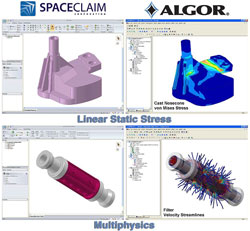
As part of ALGOR V21.1 and SpaceClaim Professional 2007+ (SP2), a fully integrated solution is now being offered by ALGOR and SpaceClaim that aims to provide thousands of users with a complete design-to-analysis solution and a unique computer-aided engineering (CAE) workflow. Users can control the CAE workflow regardless of the native CAD environment — reducing the amount of time that it takes to iterate through multiple CAE scenarios, which leads to better-performing designs and reduced project costs.
This powerful solution provides benefits in preparing models for analysis and building intelligence by being able to edit geometry for design optimization and multiple iterations.
Want more information? Click below.
ALGOR
Learn the basics of CATIA V5R17
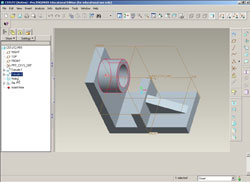
CADCIM Technologies, a pioneer in the field of CAD/CAM textbooks, announces the release of CATIA V5R17 Multimedia CD based on the textbook CATIA V5R17 for Designers by Prof. Sham Tickoo, Purdue University Calumet, and CADCIM Technologies.
The CD contains audio-visual multimedia files to help learn the basic tools of CATIA V5R17 software in a convenient and effective way. Tutorials cover the sketching, modeling, assembly, drafting, sheet-metal, and surface environments of CATIA V5R17. The CD puts special emphasis on the solid modeling techniques that improve the productivity and efficiency of the user.
Want more information? Click below.
CADCIM Technologies
EnSuite V2 adds key compare features
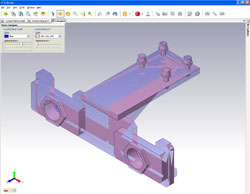
CCE announces the release of a new update of EnSuite Version 2, its multi-CAD viewing, translation, and productivity software. This release provides a wide range of new features including the ability to view two models superimposed on top of each other with the differences highlighted. It also provides the ability to isolate a part from a complex assembly by making the rest of the assembly transparent. Another new capability enables users to search for features based on parameter values.
The new compare parts functionality in V2 makes it possible for users to easily identify the differences between any two models. This function can be used in many situations such as when comparing a first article submitted by a vendor to the original design intent. Users can control how the differences between the models are highlighted, such as with different colors or different levels of transparency. The function can also be used during the design process to track how the design has evolved over time.
Want more information? Click below.
CCE
Upfront CFD for Pro/ENGINEER Wildfire 4.0
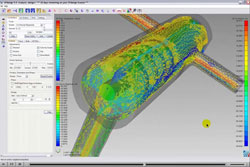
Blue Ridge Numerics announces the immediate availability of CFdesign for Pro/ENGINEER Wildfire 4.0, providing a parametric CAD-driven flow and thermal analysis environment ideally suited for mechanical, thermal, and mechatronics design engineers. Providing added flexibility for PTC customers, this new edition of CFdesign also supports CoCreate OneSpace 3D.
A long-time PTC Platinum Partner Solution, CFdesign for Pro/ENGINEER empowers engineers who want answers early in the process and don’t have time to work through the inherent barriers found in traditional CFD.
Want more information? Click below.
Blue Ridge Numerics
Online training for LabVIEW developers

Enable Training and Consulting has launched LabVIEW Mastery, the first online, video-based training curriculum for LabVIEW programmers and system integrators. Designed for both commercial and academic users, LabVIEW Mastery is available as a series of three courses: Beginner, Applications, and Professional.
The LabVIEW Mastery Beginner course covers the basics of LabVIEW programming, including an introduction to tools, features, data types, and structures. The Applications course delves deeper into important concepts, including the event structure, state machines, and data acquisition. Those already experienced in LabVIEW will benefit from the Professional course, which features advanced concepts and their applications, such as typedefs, advanced loop architectures, and advanced data acquisition.
Want more information? Click below.
Enable Training and Consulting
Hardware-independent vision software
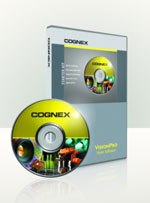
Powerful acquisition software in VisionPro 5.0 from Cognex provides pre-configured, tightly integrated support for the complete range of industrial cameras and video formats. This allows cost-effective image acquisition using GigE Vision, FireWire, Camera Link, high-speed analog, or any other image source.
VisionPro’s “QuickBuild” application-development capabilities ensure that applications get deployed quickly and efficiently. Configuring acquisition tools, defining vision tasks, and making pass/fail decisions can all be done without any programming. Advanced “vision power tools” such as PatMax, PatInspect, PatFlex, IDMax, and OCVMax accurately gauge, guide, identify, and inspect parts with reliable and repeatable results, despite variations in part appearance due to the manufacturing process. A trial version is available for download from the new Cognex website.
Want more information? Click below.
Cognex
EASYpick software upgraded

Enhancements to EASYpick order-fulfillment software from FKI Logistex include a variety of new features for cost-effective management of distribution and manufacturing fulfillment operations. The software integrates multiple light- and voice-directed picking and putting technologies and supports FKI Logistex EASYpick Pick-to-Light, GoKart, Voice, RF, and EASYput Put-to-Light.
The latest EASYpick upgrade adds enhanced reporting tools for workload planning management, quality assurance and audit, productivity, order status, wave management, and user maintenance. It also enables users to create detailed and customized reports, which can be exported to Crystal Reports and other business intelligence applications.
Want more information? Click below.
FKI Logistex
Get real-time curvature and draft analysis

Two types of analysis of utmost importance to consumer product developers are zebra stripe and draft analysis. Zebra stripe analysis is a “striping” technique that lets designers analyze curvature providing early insight into a product’s look and feel — two characteristics of extreme importance in consumer product development. Draft analysis is important for evaluating the “moldability” of a product. Not enough draft, negative draft, or undercuts increases complexity, cost, and time in both mold and product production — something all manufacturers desperately seek to avoid.
VX Version 13 hybrid modeling lets users model instantaneously with solid, surface, or wire-frame geometry in real-time analysis mode, which significantly reduces interruptions to their session or system degradation. For example, an industrial designer can simply turn on zebra striping analysis to check curvature while modeling a product and then instantly switch over to draft analysis to see if there are any draft problems.
Want more information? Click below.
VX Corporation
I/O target lets you create and tune your Simulink app

The UEISIM offers Simulink users a new, powerful, and flexible I/O target. Models built in Simulink are deployed directly on the UEISIM using The Mathworks’ Real-Time Workshop. Once programmed, the UEISIM may operate standalone or may be continuously monitored by a host computer over the Cube’s Ethernet port. This offers the Simulink user a powerful new tool for the creation and tuning of a wide variety of applications, including simulation model verification, rapid prototyping, and hardware-in-the-loop testing.
The UEISIM 300 allows the installation of up to three I/O boards. The UEISIM 600 is slightly larger and allows the installation of up to six I/O boards (containing up to 150 analog inputs or 288 DIO).
Want more information? Click below.
UEI
LabVIEW 8.5 Control Design and Simulation Module

The LabVIEW 8.5 Control Design and Simulation Module is an extension of the LabVIEW graphical system design platform that helps engineers and scientists analyze open-loop model behavior, design closed-loop controllers, simulate systems, and create real-time implementations. The latest version of the module introduces new design features such as analytical proportional integral derivative (PID) for improving system closed-loop stability and model predictive control to multivariable systems.
The LabVIEW Control Design and Simulation Module also offers expanded support of LabVIEW MathScript with the addition of 18 new .m-file functions to simplify such tasks as creating models, defining how models are connected, and analyzing system stability.
Want more information? Click below.
National Instruments
© Nelson Publishing, Inc. All Rights Reserved